---
title: "Bulk Mailings"
url: "https://books.automatevalue.com/2/spotler-connector/31/bulk-mailings"
---
🚀_NEW FEATURE : COMING_
# Bulk Mailings
✍️ DRAFT : IN PROGRESS
To do bulk mailings, like a Newsletter, Spotler has the [Mailing module](https://helpcenter.spotler.nl/hc/en-us/articles/360008482993-Introduction-Mailings-).
The information about these bulk mailings can be viewed in multiple ways inside of Dynamics 365. Each email send to a recipient from the mailing can be stored as an Email Activity for the specified Contact, Lead or Account. For each bulk mailing a Campaign is created in Dynamics 365 with insights about the mailing. Interactions with this mailing like Opens, Clicks, Bounces and Unsubscribes, are stored as Campaign Responses.
Which information is being stored in Dynamics 365 is configurable:
- Create Email/Phone Activities for Bulk Mailings? Yes/No
- Create Campaign for Bulk Mailings? Yes/No
- Create Campaign Responses for Bulk Mailings?Opens/Clicks/Bounces/Unsubscribes
See the following chapters for more details:
* [Campaign](#campaign)
* [Campaign Responses](#campaign)
---
## Campaign
Campaigns traditionally are being used to do bulk mailings within Dynamics 365. We now use Spotler [Mailing](https://helpcenter.spotler.nl/hc/en-us/articles/360008482993-Introduction-Mailings-) to distribute the emails to recipients, but we still use Campaign in Dynamics 365 to store insights and interactions about the bulk mailing.
When you have created a new Mailing in Spotler and it has started distributing the emails to recipients, a new Campaign will be created in Dynamics 365 by the connector. The name of the Campaign is the same as the name of the Mailing.
TODO: How to mark a Campaign as a Bulk Mailing sent by Spotler?
### Insights
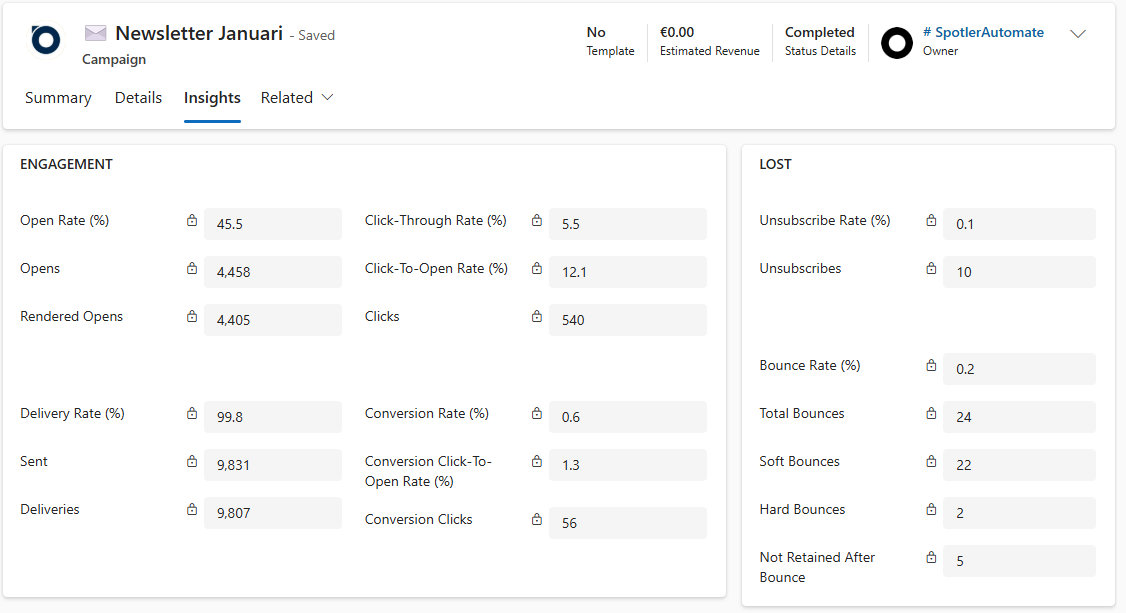
In a Campaign you can see the following information about the mailing:
| Display Name (_Name_) | Description | Data type |
|------------------------|-------------|-----------|
| # Sent
_dh_SentCount_ | Total number of emails sent | Whole Number |
| # Hard Bounces
_dh_HardBounceCount_ | Number of unique recipients whose email address generated a hard bounce | Whole Number |
| # Soft Bounces
_dh_SoftBounceCount_ | Number of unique recipients whose email address generated a soft bounce | Whole Number |
| # Total Bounces
_dh_BounceCount_ | Number of unique recipients whose email address generated a hard or soft bounce | Whole Number 🔢 |
| # Successful Deliveries
_dh_DeliveryCount_ | Number of emails that were delivered to recipients’ inboxes, calculated by subtracting hard and soft bounces from the total number of emails sent | Whole Number |
| # Opens
_dh_OpenCount_ | Number of unique recipients who opened the email. An email is considered opened if the measuring pixel is downloaded or if a trackable link is clicked. | Whole Number |
| # Rendered Opens
_dh_RenderedOpenCount_ | Number of unique recipients who have downloaded the measuring pixel in the email. Clicked links are not counted. | Whole Number |
| # Clicks
_dh_ClickCount_ | Number of unique recipients who clicked through via the email | Whole Number |
| # Conversion Clicks
_dh_ConversionClickCount_ | Number of unique recipients who clicked on a conversion link | Whole Number |
| # Unsubscribes
_dh_UnsubscribeCount_ | Number of unique recipients who unsubscribed (through an unsubscribe form, list-unsubscribe header, or spam alert) | Whole Number |
| **KPI's** | | |
| Delivery Rate (%)
_dh_DeliveryRate_ | Percentage emails that were delivered to recipients’ inboxes, calculated by subtracting bounces from the number of emails sent, then dividing that number by emails sent. | Decimal 🔢 |
| Bounce Rate (%)
_dh_BounceRate_ | Percentage of emails that cannot reach a recipient’s mailbox and get redirected back to a sender | Decimal 🔢 |
| Open Rate (%)
_dh_OpenRate_ | Percentage unique recipients that opened the email out of those who received it (OR) | Decimal 🔢 |
| Click-Through Rate (%)
_dh_ClickThroughRate_ | Percentage unique recipients that clicked on a link in the email out of those who received it (CTR) | Decimal 🔢 |
| Click-To-Open Rate (%)
_dh_ClickToOpenRate_ | Percentage unique recipients that clicked on a link in the email out of those who opened it (CTOR) | Decimal 🔢 |
| Conversion Rate (%)
_dh_ConversionRate_ | Percentage unique recipients that clicked on a conversion link out of those who received the email (CR) | Decimal 🔢 |
| Conversion Click-To-Open Rate (%)
_dh_ConversionClickToOpenRate_ | Percentage unique recipients that clicked on a conversion link out of those who opened the email (CCTOR) | Decimal 🔢 |
| Unsubscribe Rate (%)
_dh_UnsubscribeRate_ | Percentage unique recipients that unsubscribed from the email list (permission) out of those who received it | Decimal 🔢 |
🔢 = Calculated field
## Campaign Responses