Synchronize Subscriptions
The connector keeps subscription preferences in sync between Dynamics 365 and Spotler.
Subscriptions in Spotler are called Permissions — flags on a contact that indicate which mailings a contact has opted into. By default, permissions sync bidirectionally.
- Spotler Permission Table
- ➡️ Dynamics 365 → Spotler
- ⬅️ Spotler → Dynamics 365
- Marketing Lists (alternative)
- iFunds Engage 365
- Advanced
Spotler Permission Table
The Spotler Permission table is added to Dynamics 365 by the connector solution. Each row represents one subscription for a contact, account, or lead:
- Name — the permission name, matching the corresponding permission in Spotler
- Subscribed — Yes (opted in) or No (opted out)
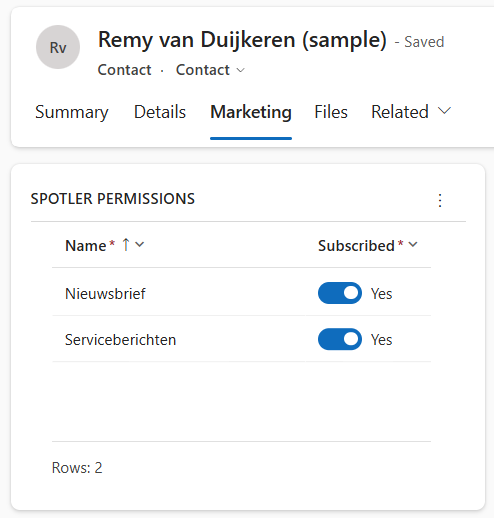
When a contact syncs to Spotler, the connector reads all Spotler Permission records for that contact and sets the corresponding permission flags in Spotler. When Spotler sends permission changes back, the connector writes them to the Spotler Permission table.
Auto-creation for new contacts: The dh_spotlerpermissions environment variable controls which permissions are pre-created (with Subscribed = No) when a new Contact, Lead, or Account is synced to Spotler for the first time. See Environment Variables for details.
Dynamics 365 → Spotler ➡️
When a Spotler Permission record changes, the pre-installed Spotler Permissions WF01 - Create Spotler Job workflow automatically creates a Spotler Job, which triggers a contact sync. A sync is also triggered by changes to the Contact, Account, or Lead record itself, or by manually creating a Spotler Job. See Configure Contact Sync for details on the workflows.
Do Not Bulk Email = Yes: The connector overrides all permission flags to false in Spotler on the next sync. The contact's personal data is preserved; only permissions are cleared.
Do Not Email = Yes: Does not clear permissions — it triggers anonymization of the contact in Spotler. See Anonymizing / GDPR.
Spotler → Dynamics 365 ⬅️
When permissions change in Spotler, the connector syncs those changes back to the Spotler Permission table in Dynamics 365.
- Single permission opt-out — the corresponding Spotler Permission record is updated. No further action.
- Global opt-out (contact fully deactivates in Spotler) — the connector sets Do Not Bulk Email to Yes, sets the Spotler Info status to Opted Out, and updates the Spotler Permission records to Subscribed = No.
Marketing Lists (alternative)
As an alternative to the Spotler Permission table, Marketing Lists can be mapped to Spotler permissions. Adding or removing a contact from a mapped list immediately triggers a contact sync.
This can be changed in the mapping configuration. Ask for it.
iFunds Engage 365
The connector is optimized for iFunds Engage 365. Periodieken (publication subscriptions) in Engage 365 are used instead of the Spotler Permission table — each Periodiek maps to a Spotler permission by name. When a Periodiek is created, updated, or deleted, the connector re-syncs the contact with the updated permissions.
On a global opt-out from Spotler, only Periodieken of type Email that are currently enabled are disabled — Post and other types are left unchanged.
Advanced
Two environment variables control which permissions are auto-created for new contacts when they are first synced. See Environment Variables for details.