Marketing Interactions
Knowing that an email was sent to a contact is useful. Knowing that they opened it three times and clicked the pricing link is actionable.
The Spotler Connector brings that level of detail into Dynamics 365 by syncing email engagement events from Spotler as Marketing Interaction records — one record per event, directly linked to the contact, lead, or account.
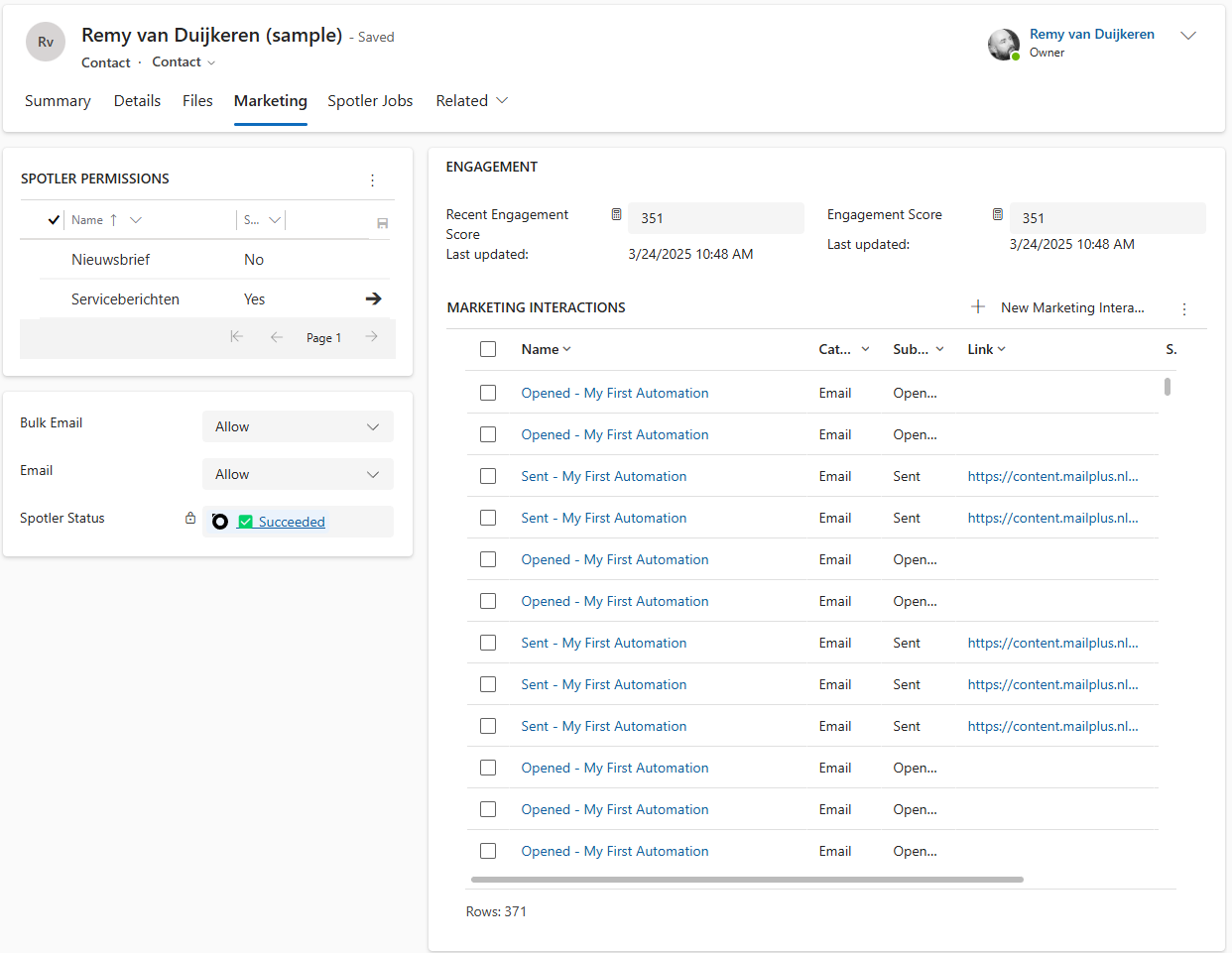
This means your sales team can see engagement history without leaving the CRM, and marketers can measure campaign impact against the contacts and accounts they care about.
💡 Marketing Interactions require the Interactions feature to be enabled on your organization. Contact AutomateValue if you do not see these records.
- What is captured
- What a Marketing Interaction looks like
- Engagement scoring
- Choosing which mailings to include
- Website interactions (Spotler Leads)
What is captured
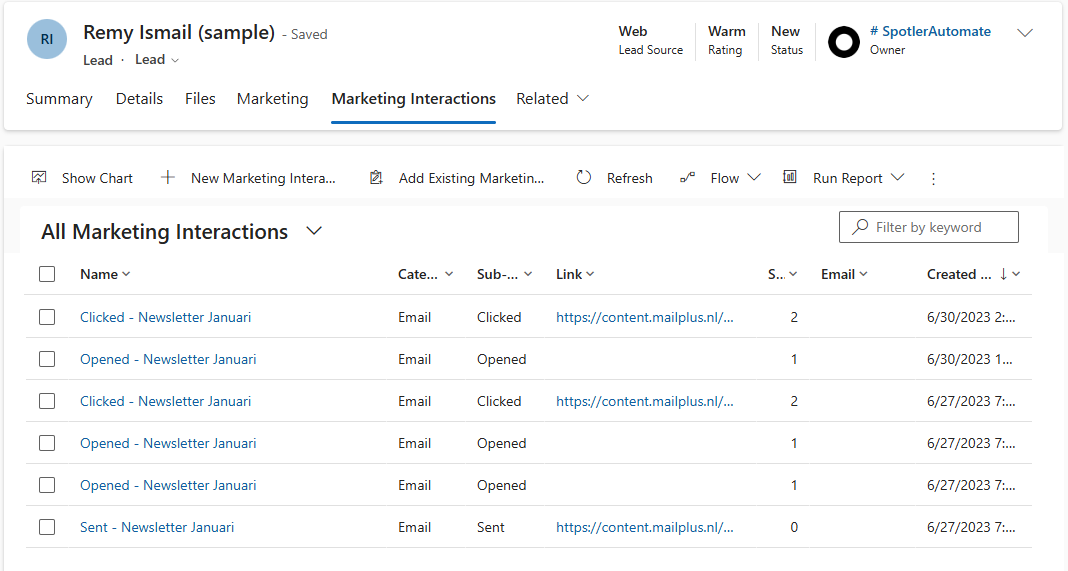
Every time a contact interacts with a Spotler mailing, that moment is captured as a separate record in Dynamics 365:
| Interaction | When it is recorded |
|---|---|
| Sent | The mailing was successfully delivered to the contact |
| Opened | The contact opened the email |
| Clicked | The contact clicked a link in the email |
| Bounced | The email could not be delivered (hard or soft bounce) |
Each event is recorded once — the connector ensures that re-syncing or replaying events never creates duplicate records.
What a Marketing Interaction looks like
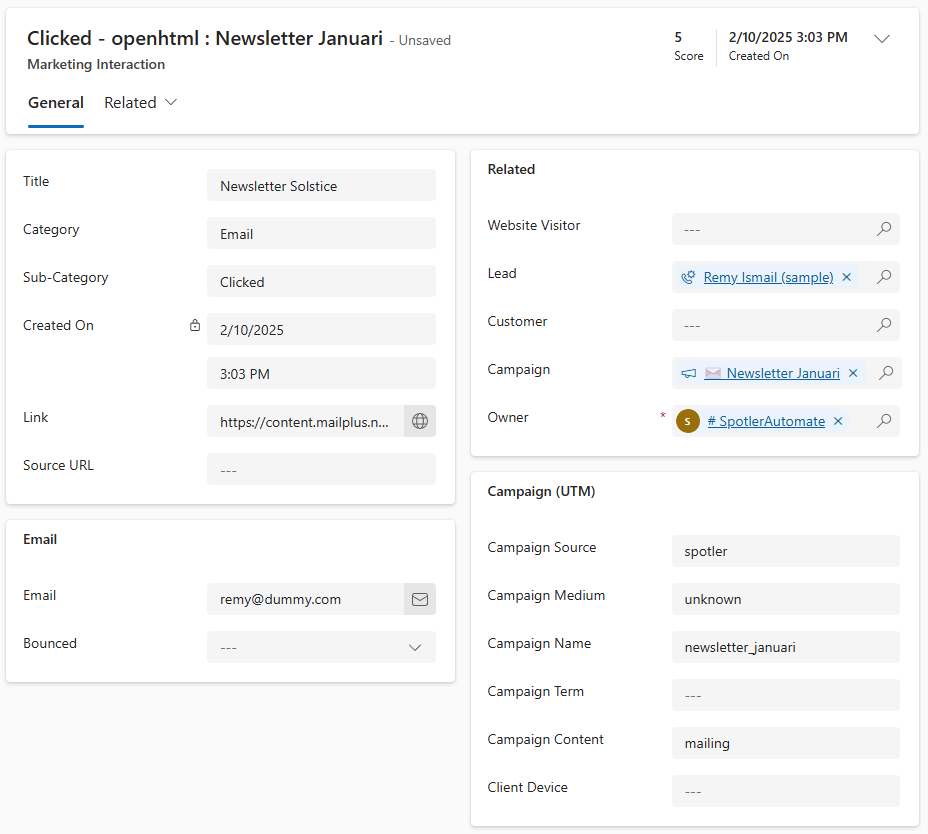
Each record shows the key details about the interaction at a glance:
- What happened — the type of interaction (Sent, Opened, Clicked, or Bounced) and the mailing it relates to
- When it happened — the date and time of the interaction
- The email — the subject line of the mailing
- The link — for click interactions: the exact URL the contact clicked
- The email address — the address the mailing was sent to
- Bounce type — for bounced interactions: whether it was a hard or soft bounce
- The campaign — a link to the related Dynamics 365 campaign, when available
- Attribution — UTM tracking values (source, medium, campaign, content) for integration with website analytics
Engagement scoring
Each interaction type carries a base score that reflects how much intent it signals:
| Interaction | Score |
|---|---|
| Sent | 0 |
| Opened | +1 |
| Clicked | +5 |
| Bounced | −5 |
These scores roll up to two fields on the contact, lead, or account:
- Engagement Score — a running total of all interaction scores over the contact's lifetime
- Engagement Weighted Score — the same total, but weighted by recency. Very recent interactions count more than older ones, and interactions older than 90 days contribute nothing at all. This score reflects how active and engaged the contact is right now rather than historically
The recency weight applied to each interaction depends on how old it is:
| Age of interaction | Weight multiplier |
|---|---|
| Up to 3 days old | 4× |
| 4–7 days old | 3× |
| 8–30 days old | 2× |
| 31–90 days old | 1× |
| Older than 90 days | Not counted (0×) |
The weighted score is recalculated every night, so it stays current as time passes.
Choosing which mailings to include
Bulk mailing can create a lot of interactions for which you may not want every type to generate interaction records. The Interactions setting lets you choose which mailing types to include:
| Type | What it covers |
|---|---|
| Mailing | Regular bulk email campaigns sent to an audience |
| Campaign | Transactional or triggered emails sent to individual contacts |
| Automation | Emails sent as part of an automated sequence |
By default, none of the types are enabled — interaction syncing is off until AutomateValue configures this setting.
Any combination can be enabled. Some things to keep in mind when choosing:
- Mailing interactions are also linked to the related Dynamics 365 Campaign record, when one exists. Campaign and Automation interactions are not.
- Enabling only Campaign & Automation and disabling Mailing is often a good default to not be overwhelmed.
- If none of the three types are enabled, then Interactions syncing is disabled.
- Turning off a type stops new interaction records from being created for that mailing type — existing records are not affected.
Website interactions (Spotler Leads)
If your organisation uses Spotler Leads, the connector can also capture website activity as Marketing Interaction records.
This shows you not just how contacts respond to your emails, but also what they do on your website — which pages they visit, what they download, which videos they watch.
💡 Website interactions are available only when Spotler Leads is active for your organization. This is configured separately from email interaction syncing.
What is captured
Spotler Leads tracks anonymous company-level visitors on your website and identifies them by company. When a tracked visit occurs, the connector creates Marketing Interaction records in Dynamics 365 for each page hit:
| Type | Description |
|---|---|
| Page Visited | A visitor viewed a tracked page |
| File Downloaded | A visitor downloaded a tracked file |
| Video Played | A visitor played a tracked video |
| Pop-up Clicked | A visitor clicked a tracked pop-up |
Each record shows the page or resource visited, when it happened, the referring URL, the visitor's device, and UTM attribution data if available.
Visitors and leads
In addition to the interaction records, the connector creates or updates two companion records for each company visitor:
- Website Visitor — a record with company information from Spotler Leads: company name, address, industry, size, lead quality rating, and visit statistics (first visit, last visit, score totals)- Lead — a standard Dynamics 365 Lead linked to the Website Visitor, making it easy to qualify and follow up on promising visitors through your existing sales process
This means you can move from "an unknown company visited our pricing page three times this week" to a qualified lead in Dynamics 365 without any manual data entry.